For every step
House inspection, house connection civil works and house connection installation – each with its own appointment.
Scheduling · Fiber rollout
In a fiber rollout, appointment scheduling decides the pace. Racon360® plans house inspection and house connection appointments per address and sub-step, logs every contact attempt and immediately shows where to follow up.

Owners get called three times without anyone knowing. Crews stand in front of locked doors, and which address can be scheduled at all only becomes clear on site.
Every contact attempt and every appointment is attached to the address. The process monitor shows the next appointment or how often the customer could not be reached – for the whole team.
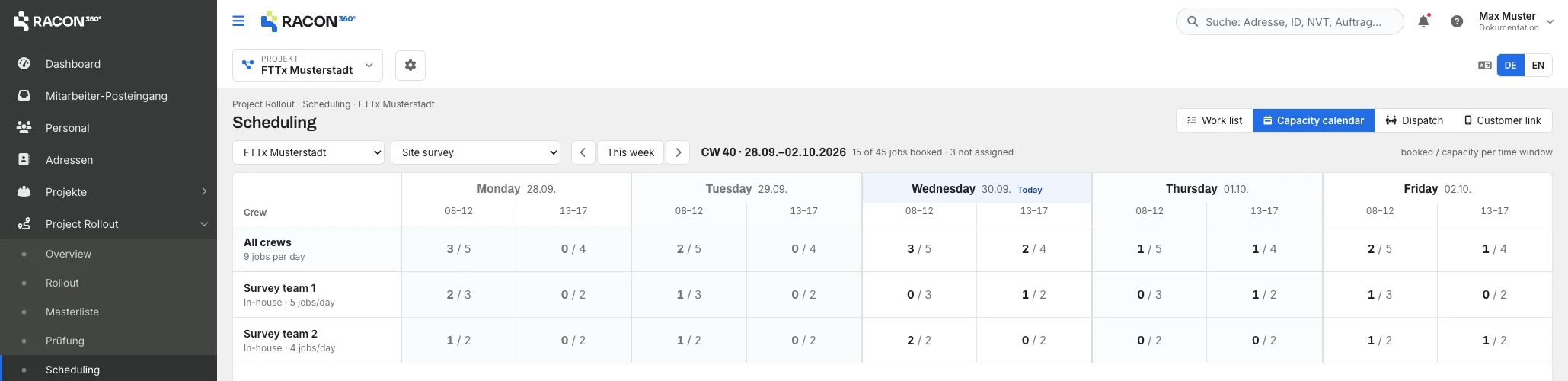
House inspection, house connection civil works and house connection installation – each with its own appointment.
Morning, afternoon or a custom time slot – as you agree it with the owner.
Book appointments for many addresses at once; confirm, reschedule, cancel or record “nobody home”.
Blocked addresses cannot be scheduled – the team immediately sees where work can continue.

Phone, SMS, email, letter or visit – with an outcome from “reached” to “wrong number”.
If an appointment is agreed, it is created immediately from the contact attempt.
The process monitor shows the next appointment or how often the customer could not be reached.
TÜV/HU, SP, UVV, maintenance and repair per vehicle – with a reminder before expiry.
Vehicles and construction machinery as rows in day, week and month view.
Vehicle appointments can be assigned to a project.
In a fiber rollout, appointment scheduling decides the pace. Racon360® plans house inspection and house connection appointments per address and sub-step, logs every contact attempt and immediately shows where to follow up.
For every step, Time slots, Bulk booking, Only schedulable addresses, Contact log, Appointment straight from the call, Status in the monitor, Inspection and maintenance appointments, Resource timeline, Project reference.
For Dispatch, Site management, Project management, Fleet management.
Scheduling is part of the NE3 rollout and fleet management: appointments are attached to addresses and vehicles and appear where the team already works.
House inspection, house connection civil works and house connection installation – each with its own appointment. As a time slot you choose morning, afternoon or a custom time slot.
Every contact attempt by phone, SMS, email, letter or visit is in the contact log with its outcome. The process monitor shows how often the customer could not be reached; “nobody home” can be recorded on the appointment.
Yes. With bulk booking you book appointments for many addresses at once and can confirm, reschedule or cancel them.
Blocked addresses cannot be scheduled – the team immediately sees where work can continue.
Scheduling is part of the NE3 rollout and fleet management: appointments are attached to addresses and vehicles and appear where the team already works.
We show you the module in a short demo – with your processes instead of slides.
Whether you want to learn more about features, request a custom demo, or just say hello - we're here for you.
Get in touch and take your construction processes to the next level.

Managing Director, IT Architect
Building Infrastructure Construction Technologies GmbH (Bicon Tech)