Status from the start
Prequalification, active, in project or blocked – every partner’s status is visible to everyone.
Subcontractor management · Partner management
Partner management in Racon360® is your subcontractor management software for general contractors and construction companies: it brings together master data, contracts, mandatory documents, staff and projects of your subcontractors – and gives your partners their own access instead of sending everything back and forth by email.
Exemption certificates expire unnoticed, minimum wage declarations (MiLoG) sit in some inbox, and nobody knows exactly which employees of a subcontractor are on site right now.
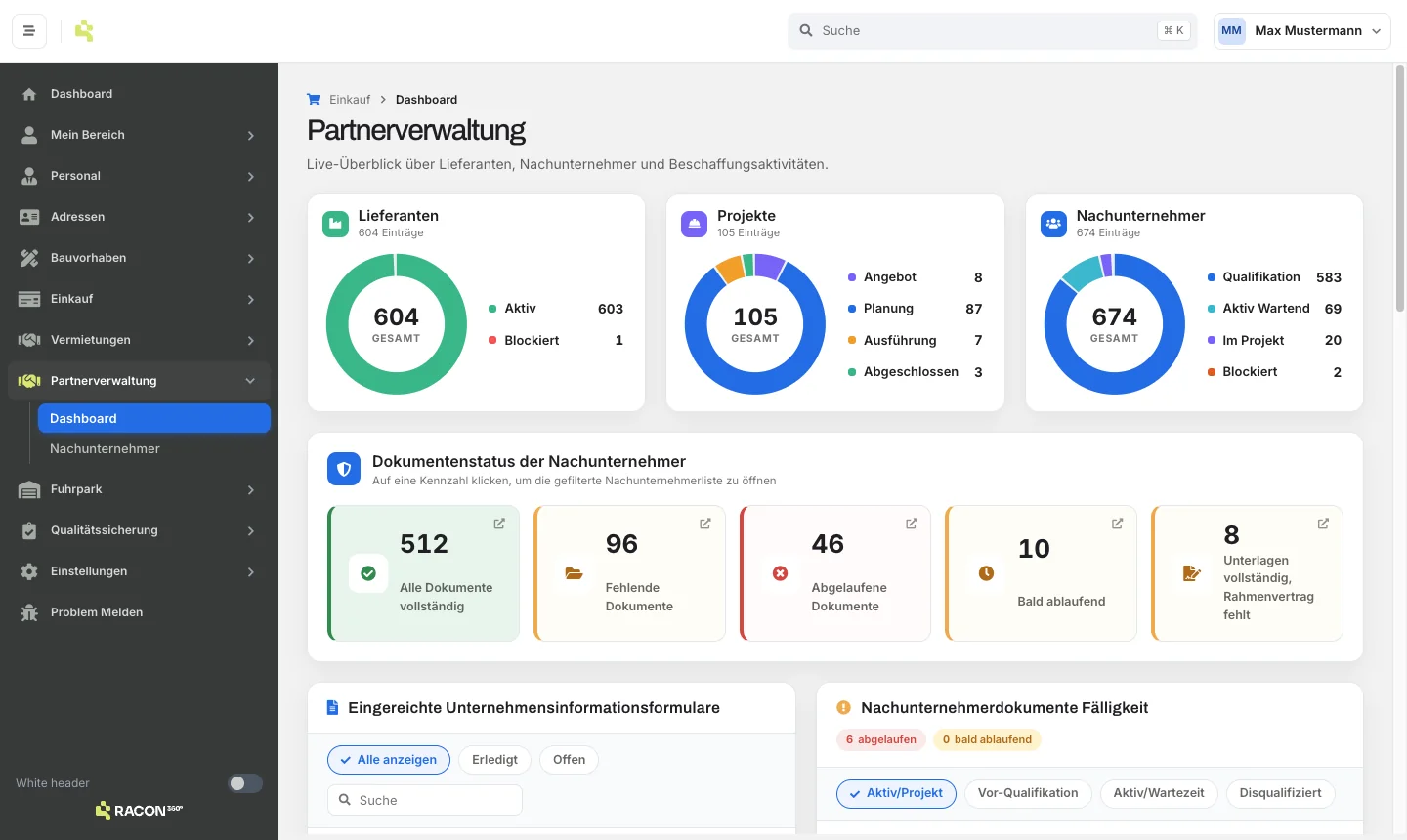
Every subcontractor has a file with status, mandatory documents and deadlines. The partner dashboard shows where documents are missing or expiring, and Racon360® sends reminders automatically.
From first contact to running project: company profile, contracts, employees, equipment, projects, tickets, reports, bill of quantities and invoices in one place.
Prequalification, active, in project or blocked – every partner’s status is visible to everyone.
Subcontractors fill in company data, staff, machinery, certificates and bank details themselves – no login required.
Framework agreement, MiLoG and working hours act (ArbZG) declarations, data protection, NDA, project agreement and site briefing stored centrally.
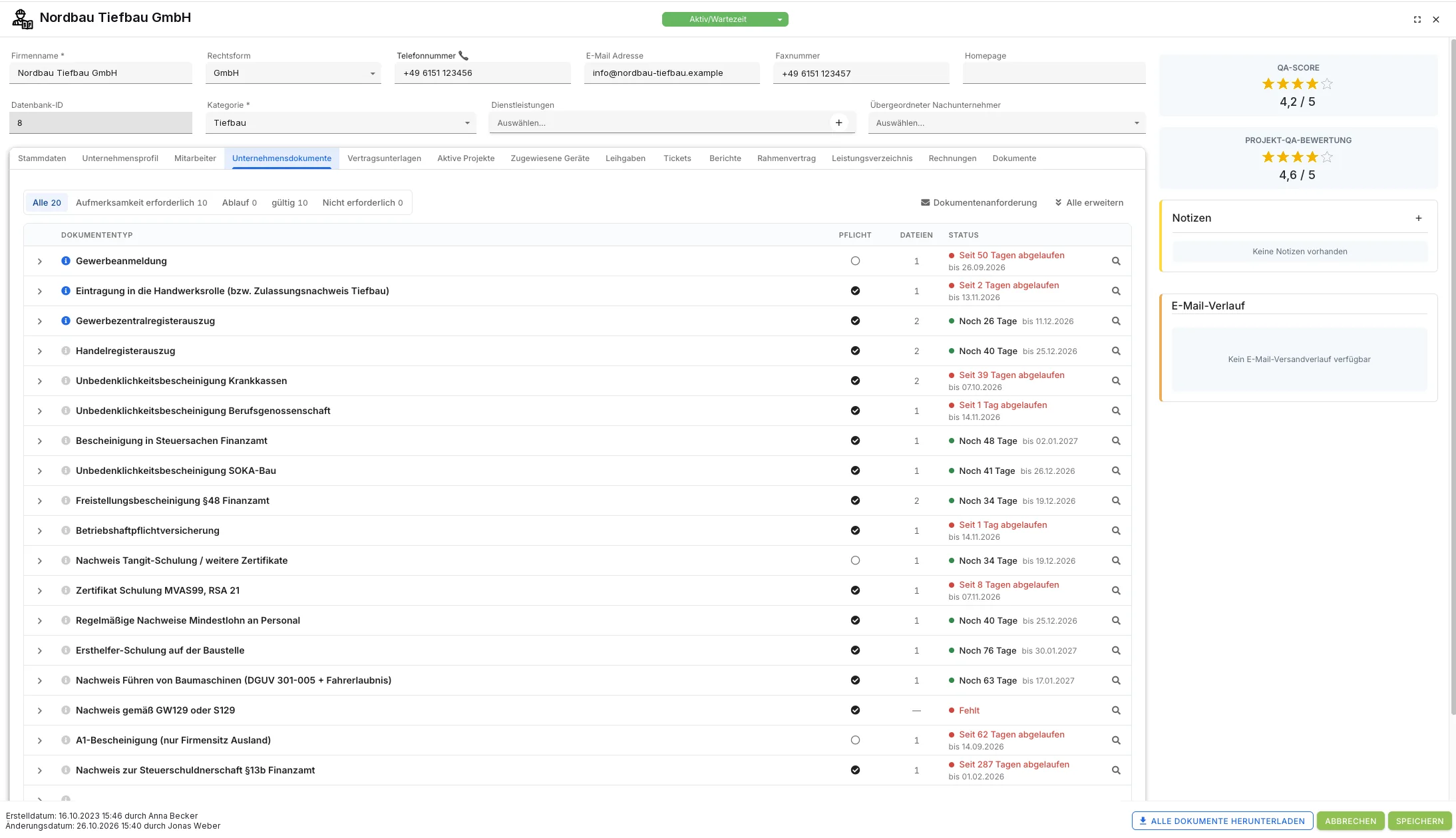
Trade registration, exemption certificate (Freistellungsbescheinigung, §48b EStG), clearance certificates from health insurance, statutory accident insurance and SOKA-BAU, public liability insurance or minimum wage proof: every document type has a mandatory flag, an expiry date and a status.
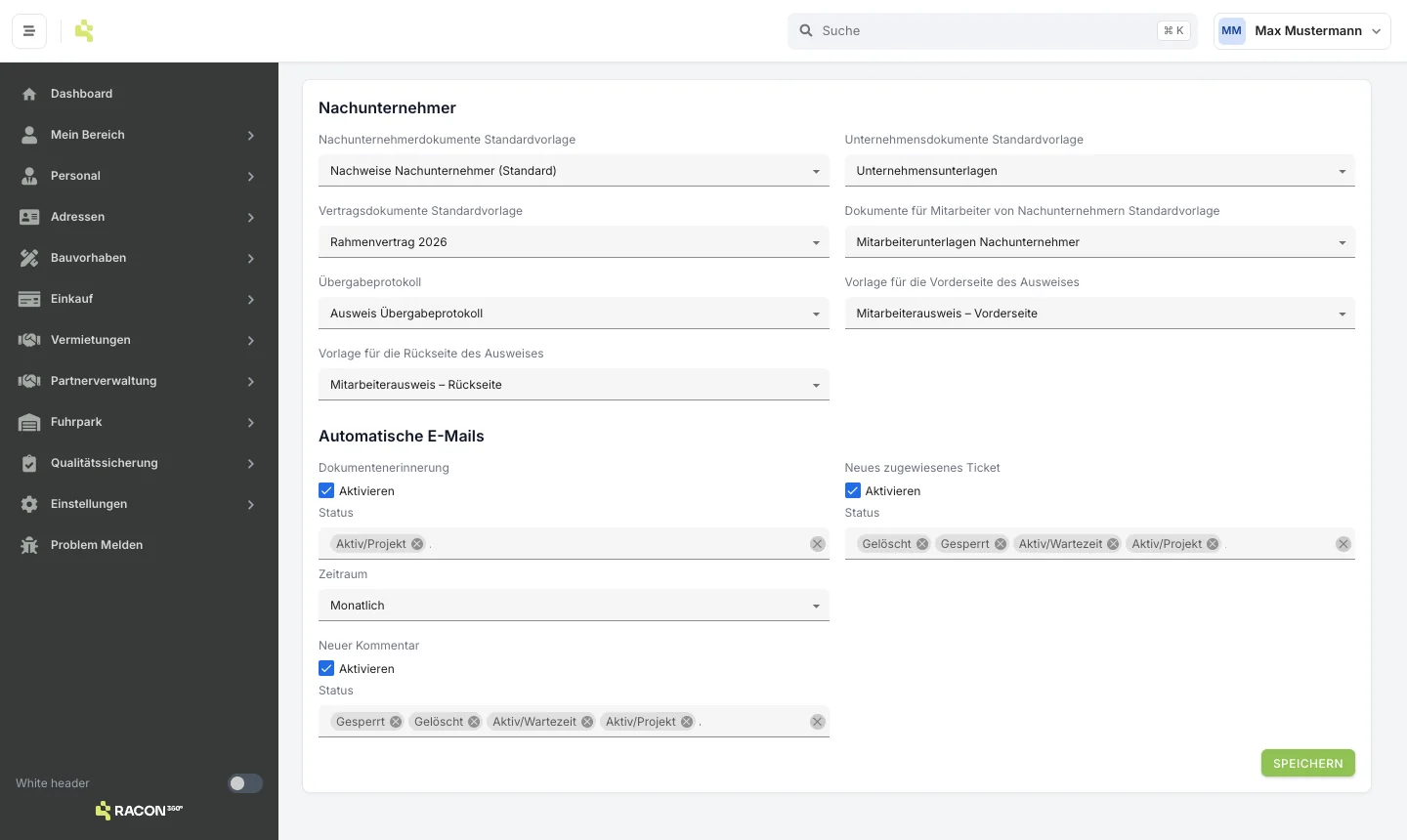
Define which proofs are required per trade – with a due date per document type.
Racon360® shows what expires soon or how many days ago it expired; new versions replace old ones.
Emails to subcontractors for missing documents, new tickets or comments – at the interval you set.
Document compliance, incomplete documents, due dates and open invoices at a glance.
Nobody has to chase by phone anymore: the subcontractor automatically receives an email until their file is complete.
The subcontractor uploads the exemption certificate, insurance and more themselves – via the self-disclosure link or in the partner portal.
Mandatory documents per category and expiry dates are compared: is something missing, expiring soon or already expired?
Email to the subcontractor – daily, twice a week, weekly or monthly, configurable per partner status.
Complete, missing, expired and soon-to-expire documents at a glance – one click to the filtered list.
As long as something is missing, Racon360® reminds at the set interval – new versions automatically replace the old ones.
The subcontractor’s employees register themselves – with social security number (SV-Nummer), photo and ID. Your office only reviews.
One employee link per subcontractor, sent by email. Valid until a set date, can be deactivated at any time.
No login, on their phone: personal details, 12-digit social security number or alternatively the immediate notification (Sofortmeldung), photo taken directly with the camera and ID upload.
Missing details are marked, typos can be corrected, and Racon360® detects duplicates via the social security number.
Accept and create the ID card: front and back from your template, ready for the card printer.
Subcontractor employees register themselves, your office reviews – and Racon360® assembles the ID card from your template.
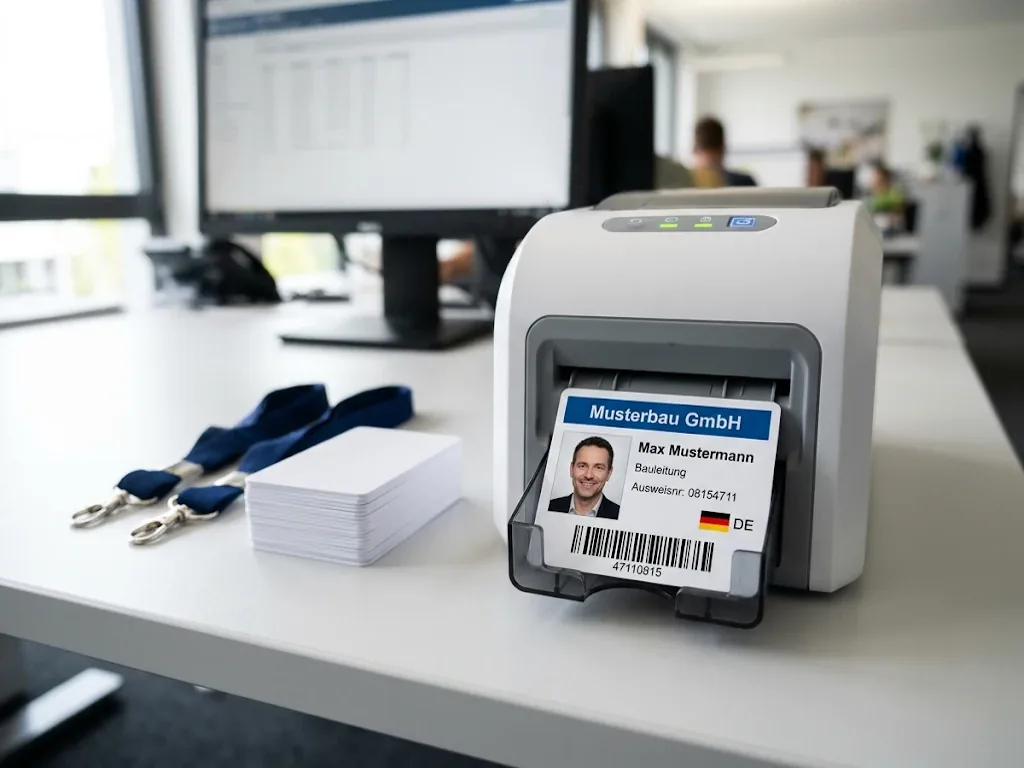
Data, photo and ID document arrive by link from the subcontractor’s employee. After review, Racon360® generates front and back from your templates – ready for the card printer, also for several employees at once.

If documents do arrive on paper, scan them straight into the subcontractor file via TWAIN Connect – no detour through folders and uploads.
Internal audits and on-site QA don’t end up in folders, but in a rating per subcontractor.
Your own question catalog for the company audit: yes, no or not applicable, with comment, photos and signature.
QA reports per project – also specifically for fiber optics – captured on site in the app, with photos, voice note and signature.
Every subcontractor carries their QA rating in the list. The profile shows internal and site QA side by side – the internal rating broken down by category.
Every new or changed report updates the rating – so before the next award you see who delivers.
The same Racon360® app – with permissions that define exactly who sees what.
Your site management inspects with the freely configurable question catalog: a photo per checkpoint, voice note instead of typing, signature on the display – even offline.
Subcontractors record daily reports, fiber optic reports and accident reports themselves – automatically in the name of their own company.
Partners only see the project folders for which you have granted read access – plans and documents always in the current version.
Partners upload other reports and proofs in their own workspace – with version history instead of email attachments.
Subcontractors see their projects with file manager, version history, project map and project chat – with permissions per user and project.
Invited subcontractors record fiber optic reports directly in the Racon360® app and see released project folders.
In the fiber rollout, subcontractors are assigned addresses and sub-steps and only see their own.
Export master data as CSV or JSON and all documents including versions at the push of a button.
Partner management in Racon360® is your subcontractor management software for general contractors and construction companies: it brings together master data, contracts, mandatory documents, staff and projects of your subcontractors – and gives your partners their own access instead of sending everything back and forth by email.
Status from the start, Self-disclosure via link, Contracts and declarations, Mandatory documents per category, Expiry at a glance, Automatic reminders, Partner dashboard, Upload proofs, Racon360® checks, Automatic reminder, Dashboard up to date, Send link, Employee enters their data, Office reviews, ID card ready, Employee ID card from your template, Scan proofs directly, Internal QA audit, Site QA, Star rating, QA reports on site, Reports from the subcontractor, Released plans and documents, File proofs, External Workspace, Mobile app for partners, Assign rollout packages, Complete data export.
For Purchasing and partner management, Site management, Subcontractor, Subcontractor employees.
Subcontractors work on assigned addresses in the NE3 rollout, record reports in the mobile app, receive material from the warehouse and submit invoices that are approved via workflows.
Typical are trade registration, trade register entry or proof of authorization, Central Trade Register and commercial register extracts, clearance certificates from health insurers, statutory accident insurance and SOKA-BAU, tax compliance certificate, exemption certificate under §48b, public liability insurance and minimum wage proof. In Racon360® you define per category which of these are mandatory.
Racon360® stores every document with an expiry date, shows “X days left” or “expired X days ago” and automatically reminds the subcontractor by email until a new version is uploaded.
Yes, both terms mean companies that perform work on behalf of a main or general contractor. In construction, “Nachunternehmer” (NU) is common – Racon360® calls the module partner management.
Managing master data, contracts, mandatory documents, staff and projects of your subcontractors in one place – from prequalification to invoice. In Racon360® every subcontractor has a file with status, mandatory documents and deadlines for this.
Via the self-disclosure link without a login or in the partner portal. The subcontractor fills in company data, staff, machinery, certificates and bank details and uploads their proofs; new versions replace the old ones.
Daily, twice a week, weekly or monthly – configurable per partner status. The email goes to the subcontractor automatically as long as something is missing.
The clearance certificates (Unbedenklichkeitsbescheinigungen) from health insurance, statutory accident insurance and SOKA-BAU – each as a document type with a mandatory flag, an expiry date and a status.
Subcontractors work on assigned addresses in the NE3 rollout, record reports in the mobile app, receive material from the warehouse and submit invoices that are approved via workflows.
We show you the module in a short demo – with your processes instead of slides.
Whether you want to learn more about features, request a custom demo, or just say hello - we're here for you.
Get in touch and take your construction processes to the next level.

Managing Director, IT Architect
Building Infrastructure Construction Technologies GmbH (Bicon Tech)